CVSP-AIE (Comprehensive Virtual Screening Platform with Artificial Intelligence Engine) is a fully data-driven virtual screening platform for small molecule drug discovery based on AI-powered docking methods[1], integrating three state-of-the-art protein ligand docking and re-scoring models, namely KarmaDock[2], CarsiDock[3], and RTMscore[4].
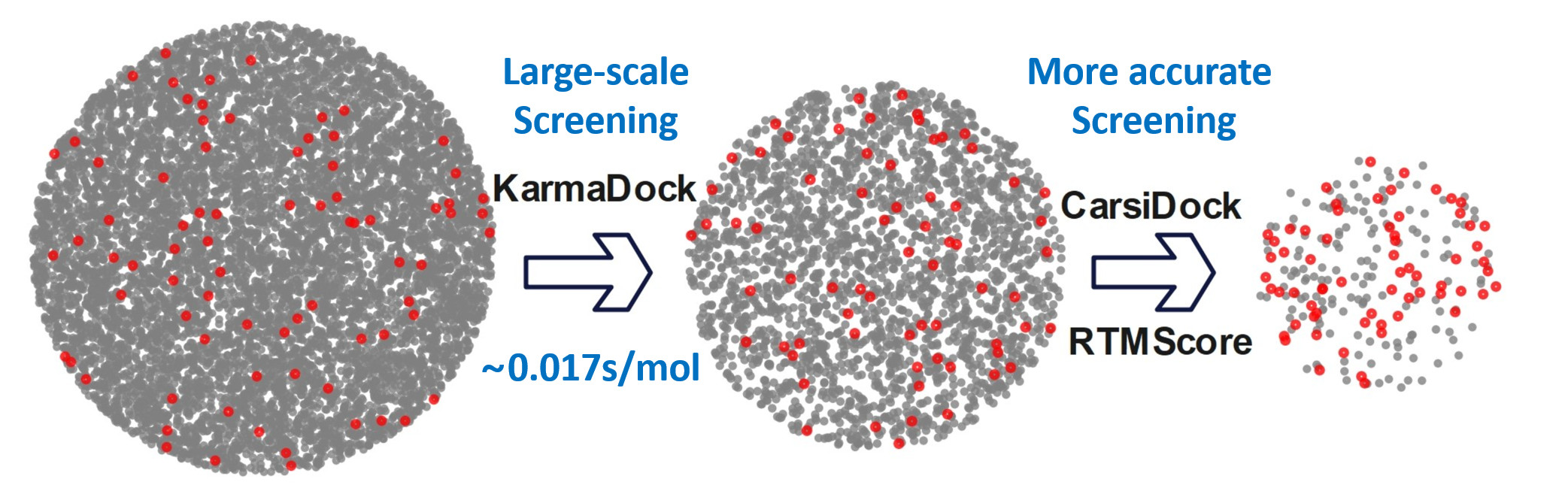
- [1] Shukai Gu, Chao Shen, Xujun Zhang, et al. Benchmarking AI-powered docking methods from the perspective of virtual screening. Nature Machine Intelligence, 2025, 7, 509–520. [HTML] (Hierarchical Virtual Screening)
- [2] Xujun Zhang, Odin Zhang, Chao Shen, et al. Efficient and accurate large library ligand docking with KarmaDock. Nature Computational Science, 2023, 3, 789-804. [HTML] (KarmaDock)
- [3] Heng Cai, Chao Shen, Tianye Jian, et al. CarsiDock: a deep learning paradigm for accurate protein-ligand docking and screening based on large-scale pre-training. Chemical Science, 2024, 15(4), 1449-1471. [HTML] (CarsiDock)
- [4] Chao Shen, Xujun Zhang, Yafeng Deng, et al. Boosting Protein-Ligand Binding Pose Prediction and Virtual Screening Based on Residue-Atom Distance Likelihood Potential and Graph Transformer. Journal of Medicinal Chemistry, 2022, 65(15), 10691-10706. [HTML] (RTMScore)
Platform Highlights
- AI-Powered Accuracy: Leverages deep learning models trained on extensive structural data
- Hierarchical Screening: Optimized workflow balancing computational efficiency and prediction accuracy
- User-Friendly Interface: Streamlined submission process with comprehensive result visualization
- Scalable Architecture: Supports both web-based and local deployment for small to ultra-large screening campaigns
Function Modules
CVSP-AIE provides six specialized modules to accommodate diverse virtual screening requirements, namely Pre-processing, HeVS, HpVS, HierarchicalVS, HpRS, and CvPL. For most users, we strongly recommend the HierarchicalVS module as it provides the optimal balance between computational efficiency and screening accuracy. Additionally, we developed a local version of CVSP-AIE (https://github.com/shukai1997/HierVS) to support super-large-scale virtual screening task.
| Module | Description | Use Case | Timing |
|---|---|---|---|
| Pre-processing | Automated preparation and standardization of protein and small molecule structures | Preliminary structure validation and formatting | 6-10 mins (100, 000 compounds) |
| HeVS (High-efficiency VS) |
Rapid virtual screening using KarmaDock for initial compound prioritization | Initial screening of ultra-large compound libraries (<1 million molecules) | 15-20 mins (100,000 compounds) |
| HpVS (High-precision VS) |
High-accuracy docking and screening using CarsiDock | Precise assessment of small, focused libraries (<10,000 molecules) | 19-24 mins (1,000 compounds) |
| HierarchicalVS (Recommended) |
Integrated workflow combining KarmaDock (rapid screening), CarsiDock (precision docking), and RTMscore (final ranking) | Standard virtual screening tasks requiring optimal efficiency-accuracy balance ( <1 million molecules) | 34-45 mins (100,000 compounds by efficient docking, top 1000 ranked molecules by precise docking and re-scoring) |
| HpRS (High-precision Re-scoring) |
Re-evaluation of existing docking poses using RTMscore for improved ranking | Post-processing and optimization of docking results from other methods | 1-2 mins (5,000 compounds) |
| CvPL (Calculation and Visualization of Protein-Ligand Interactions) |
Post-docking analysis and visualization of protein-ligand interactions | Detailed interaction analysis for hit optimization and binding mechanism studies | 1-2 mins (10 compounds) |
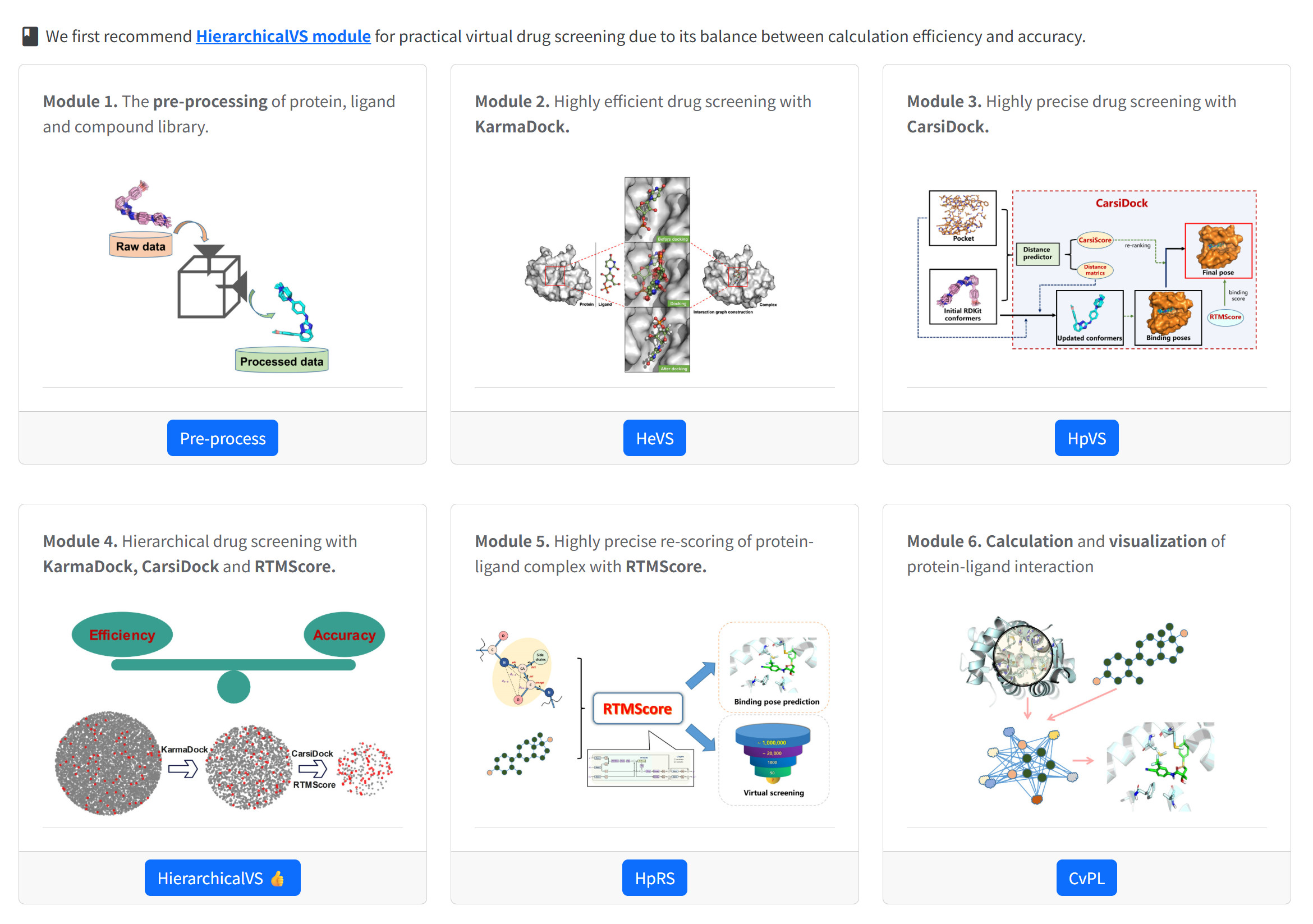
Data Preprocess with Pre-process Module
When using the online web server for VS, users first need to obtain the 3D structure of the target protein under study and the ligand that bind to it, which are mainly used to locate the binding pocket. Users can select two types of compound libraries for screening: the offered compound library by the system, which has undergone preprocessing to ensure compatibility with the VS workflow; and a user-uploaded custom compound library. Such libraries must be manually preprocessed via the Preprocess module before used for subsequent screening, so as to avoid potential interruptions caused by non-standard molecular formats.
CRITICAL STEP The pre-processing module generates standardized outputs of receptor structures and ligand libraries that serve as critical inputs for downstream virtual screening workflows. Errors in preprocessing may lead to failures in downstream docking.
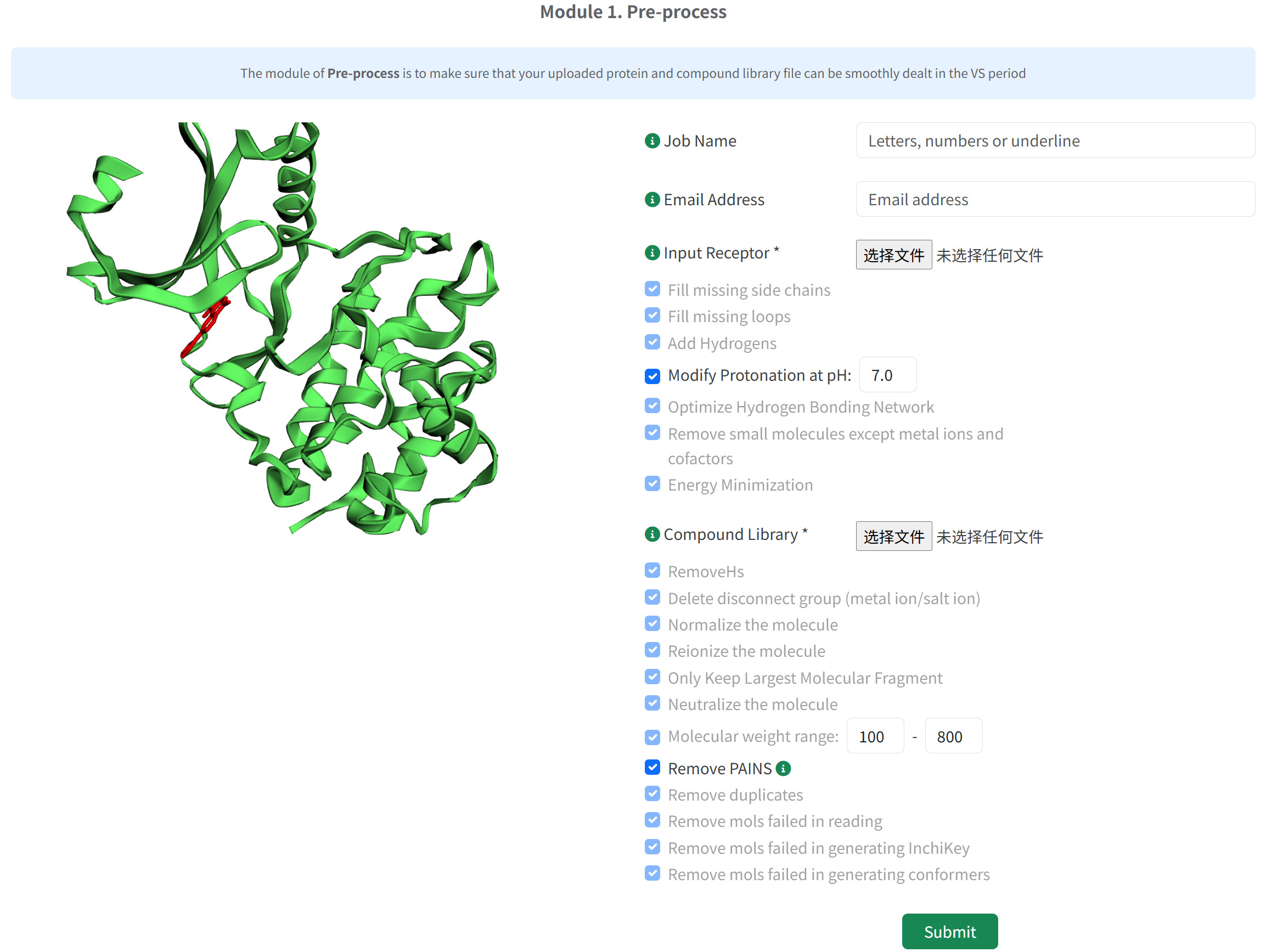
- Upload the protein structure file in PDB format and select appropriate preprocessing options
- Upload the compound library file in txt or smi format and select appropriate preprocessing options
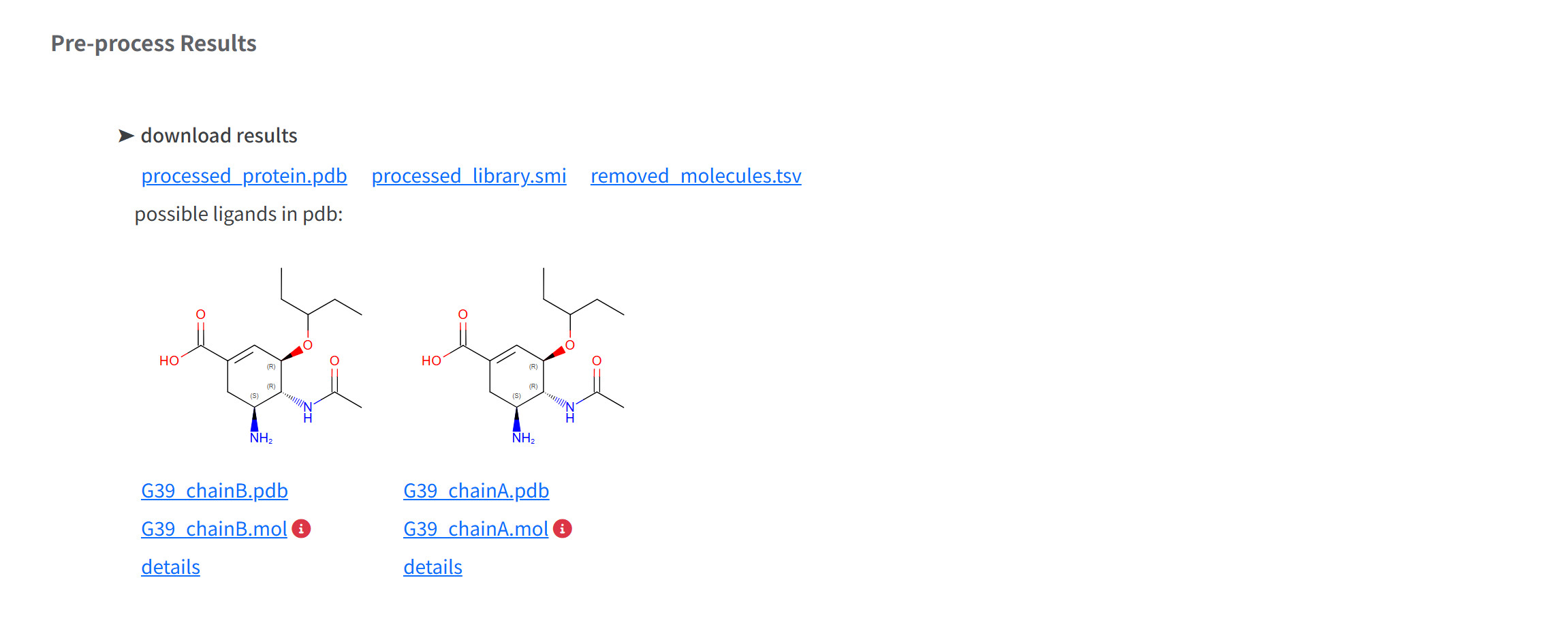
- Upon preparation job completion, preprocessed files is provided for download at result page. Save the results locally. (1) Processed Protein Structure (processed_protein.pdb)
NOTES Protein structures can be downloaded from the RCSB database; if the corresponding structure is not available in the database, it is recommended to use modeling tools such as AlphaFold3 or Boltz-2 for protein-ligand complex structure prediction. After obtaining the structures, it is advisable to preprocess the protein structure using the Preprocess module before conducting VS tasks —especially when the structure is sourced from the RCSB database, as such structures often have issues like missing loop regions.
CRITICAL STEP
Users can select two types of compound libraries for screening: the offered compound library by
the system, which has undergone preprocessing to ensure compatibility with the VS workflow; and
a user-uploaded custom compound library. For user-uploaded libraries, we recommend
sourcing compounds from the following databases and commercial suppliers:
Public Databases
Commercial Suppliers
(2) File content requirements:
CAUTION The first column of the compound library file must be SMILES, the second column must be the molecular name, and the tab (\t) is used as the separator;
tabAspirinCC1([C@@H](N2[C@H](S1)[C@@H](C2=O)NC(=O)CC3=CC=CC=C3)C(=O)O)C
tabBenzylpenicillin(3) The number of compounds is limited to [1, 1000000];
(2) Curated Compound Library (processed_library.smi)
(3) Removed Molecules Log (removed_molecules.tsv) - Enables researchers to review filtering decisions and adjust parameters if needed
(4) Processed Ligand Components in PDB Format
The module also identifies and processes potential ligand molecules present in the original protein structure, which are mainly used to locate the binding pocket. Isolated ligand structure in pdb format and converted to mol format.
CAUTION The MOL file was converted from the PDB file using OpenBabel, but the resulting chemical structure may not be accurate. Please download the ligand in pdb file format for subsequent operations.
Hierarchical Virtual Screening with HierarchicalVS Module. 👍👍
It is essential to balance both screening speed and accuracy in practical VS campaigns. HierarchicalVS is a fully AI-driven virtual screening platform, which first employs KarmaDock for efficient docking, then selects the top N molecules and further performs accurate docking and scoring using CarsiDock and RTMScore.
Job Submission
HierarchicalVS module requires users to separately upload the PDB structure of the studied target and small molecule file (mol, SDF, MOL2, and PDB) for binding site identification. Additionally, we recommend that the protein structure undergo Schrödinger processing prior to submission to maintain consistency with training set of the embedded model.
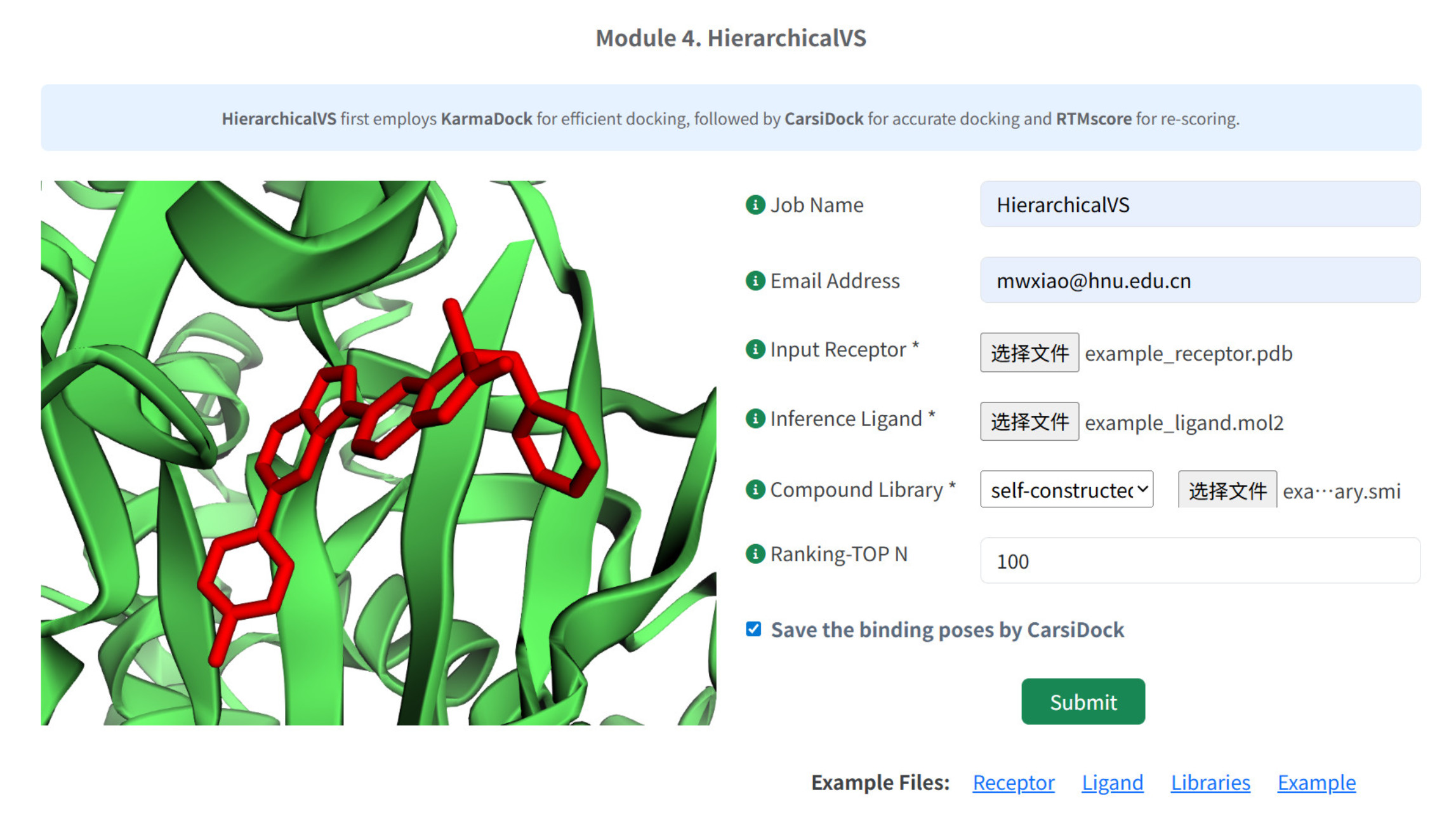
- Job Identification and Tracking
- (Optional) Enter a descriptive Job Name for result identification and management.
- (Optional) Provide valid Email Address for notification upon job completion.
- Receptor Structure Preparation
Upload protein structure file in PDB format.CAUTION Please preprocess the target protein file with the platform's pre-processing module before uploading.
- Reference Ligand Specification
Input known active ligand to define binding site coordinates. The protocol requires the submission of a ligand structure in one of the supported formats (MOL, PDB, MOL2, or SDF). The system automatically extracts the ligand's spatial coordinates and defines a search space around these coordinates.CAUTION For users unfamiliar with extracting active small molecules from protein structures, follow this protocol to ensure accurate binding site definition: First, retrieve the target protein structure (e.g., via RCSB PDB) and use our preprocessing module (Pre-processing of protein → Processed Ligand Components in PDB Format) to isolate embedded ligands. Critically, validate that the extracted ligand in a biologically relevant cavity (e.g., catalytic site or allosteric pocket) by cross-referencing RCSB annotations and published literature.
- Compound Library Selection
Choose from two library options:
Option A: Self-constructed Library- Upload custom compound library in SMILES formats
- Maximum capacity: 1,000,000 molecules
CAUTION Please preprocess the compound library with the platform's pre-processing module before uploading.
TROUBLESHOOTING We also provide local version of HierarchicalVS (https://github.com/shukai1997/HierVS) for much larger libraries screening.
Option B: Pre-curated Libraries
Select from four established databases:- ChemDiv_clustered_300K: Approximately 300,000 diverse compounds from Chemical Diversity
- Enamine_HHL_460K: Approximately 460,000 high-hit-likelihood compounds
- Specs_SC_326K: Approximately 326,000 screening compounds from Specs
- DrugBank_2K: 2044 approved drugs (molecular weight range 100-600)
CAUTION Platform-provided libraries are academic research use only
If you are unsure if the file you submitted can be processed correctly, please compare it with relevant example files.
- Configure Parameters
Ranking-TOP N: KarmaDock predicts all molecules in the compound library, and those ranking-TOP N are further docked and scored by CarsiDock and RTMscore.
CAUTIONTopN is limited to the range of [10, 10000]. We recommend TopN between 200 and 1000, which can balance accuracy and efficiency.
Save Binding Poses: Whether or not to save CarsiDock-based docking poses.
- Submission of HierarchicalVS
Job Monitoring
Upon job submmison, The webpage will redirect to the job status monitoring interface, which refreshes every 20 seconds. This page shows the job status, with the current stage highlighted in red color, and an estimated time for completion. The prediction process is divided into several steps from queuing in our job management system to the final stage of job completion. Either keep the page open or bookmark this page to check the results later. Once the job is done, this page will automatically display all the modeling results. At the same time, a notification email with instructions for accessing the result page will be sent to the user if an email address was provided.
CRITICAL STEP We recommend providing an email address or bookmarking the result page right after your submission.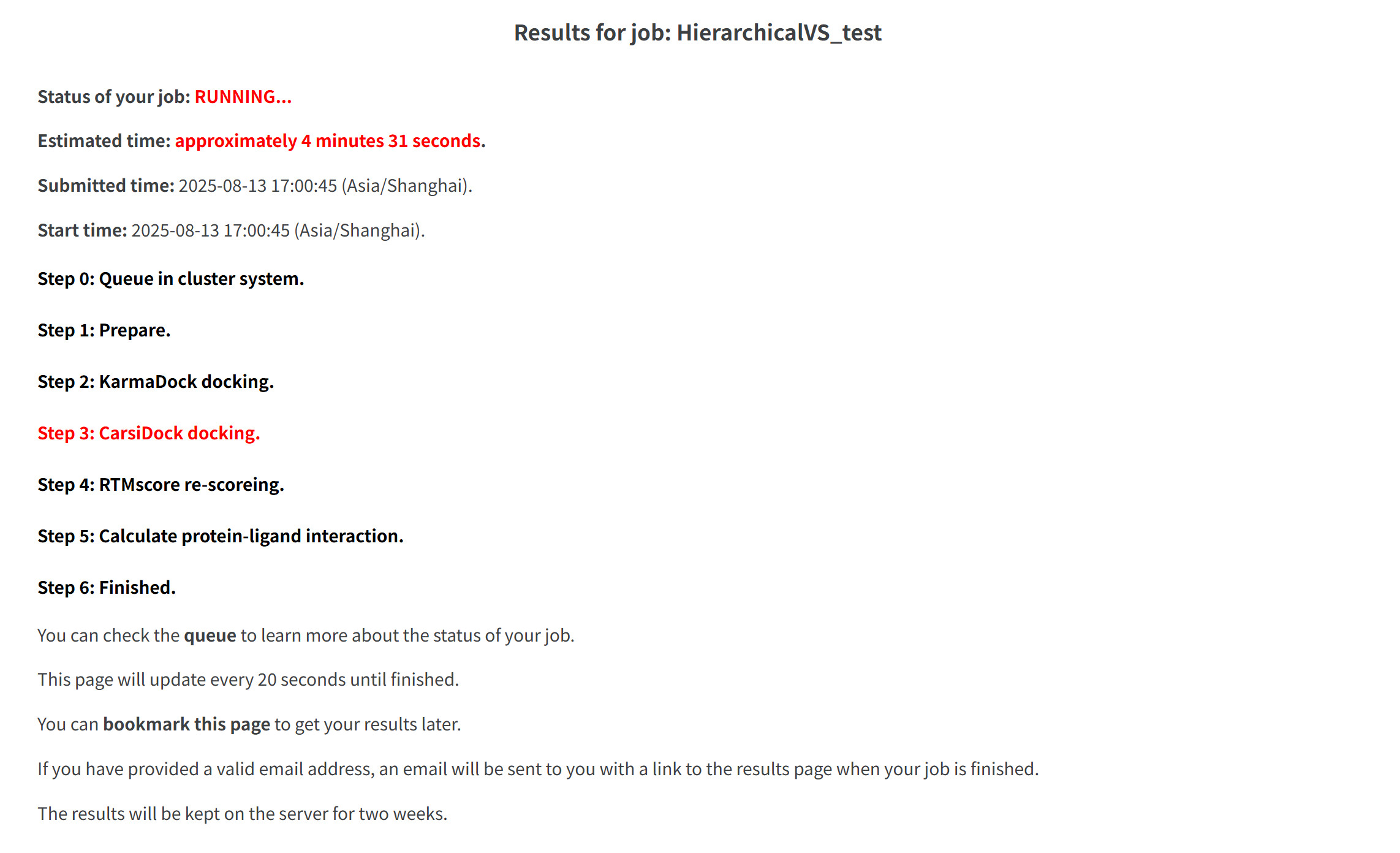
Job Output
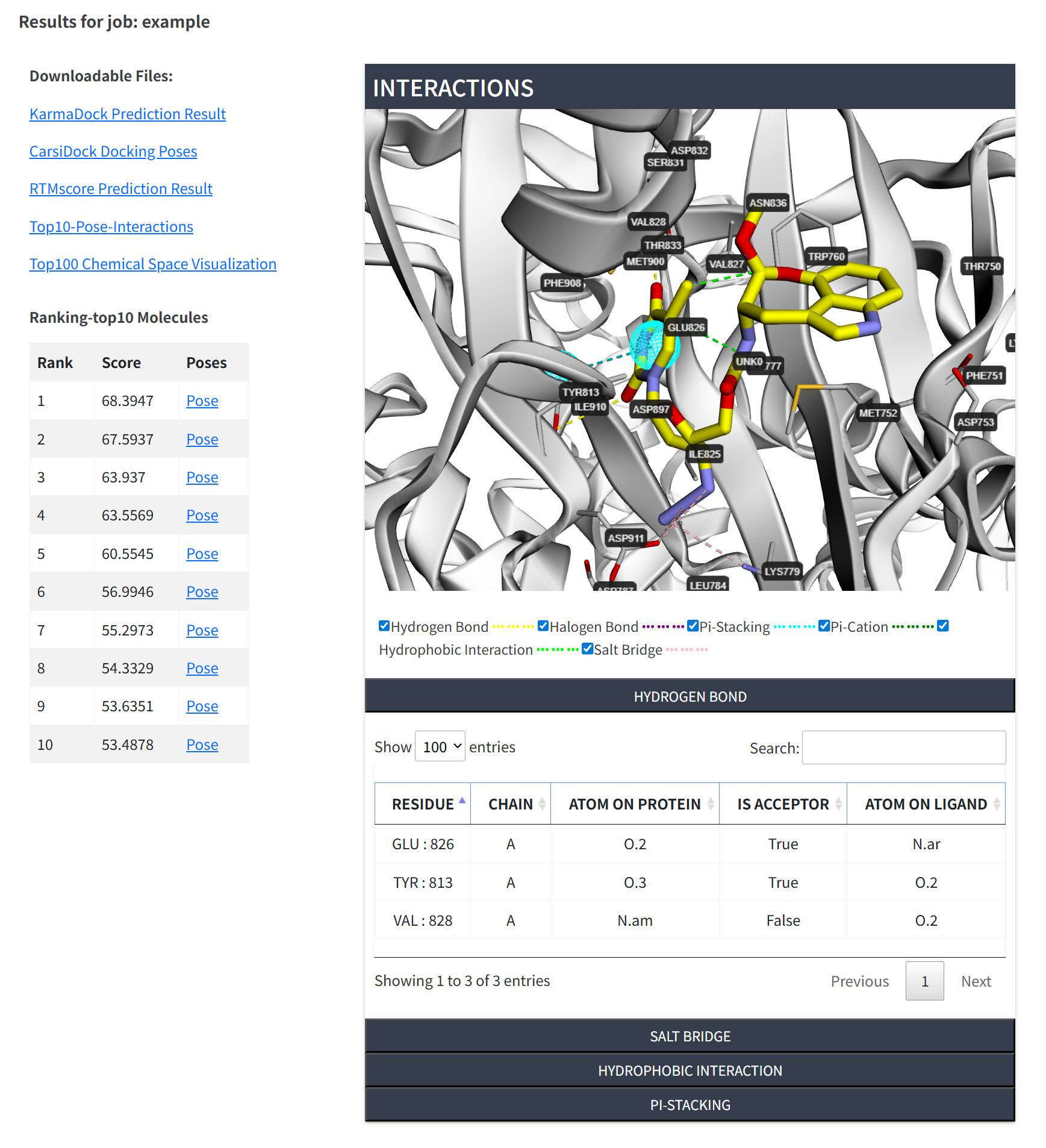
The result page features:
-
Results for job: Task ID of the job.
-
Downloadable Files: KarmaDock Prediction Result, the predicted ligand poses by CarsiDock, CarsiDock & RTMScore Prediction Result, the interactions between the protein and the ligands ranking top10 by RTMscore.
KarmaDock Prediction Results (karmadock_prediction_dealt.csv)
The KarmaDock prediction results are available for download as .csv file. The table below shows an example of the output format:
CarsiDock Docking Poses (ligand_poses.zip)inchikey karma_score karma_score_ff karma_score_aligned smiles mol_name XUKUURHRXDUEBC-KAYWLYCHSA-N 57.29055023 49.81292725 36.30753326 CC(C)c1c(C(=O)Nc2ccccc2)c(-c2ccccc2)c(-c2ccc(F)cc2)n1CC[C@@H](O)C[C@@H](O)CC(=O)O Atorvastatin SEERZIQQUAZTOL-ANMDKAQQSA-N 52.29211807 48.40772629 32.61946869 COCc1c(C(C)C)nc(C(C)C)c(/C=C/[C@@H](O)C[C@@H](O)CC(=O)O)c1-c1ccc(F)cc1 Cerivastatin ARAIBEBZBOPLMB-UFGQHTETSA-N 51.78099442 48.66449356 33.17255783 CC(=O)N[C@H]1[C@H]([C@H](O)[C@H](O)CO)OC(C(=O)O)=C[C@@H]1N=C(N)N Zanamivir
All predicted ligand binding conformations generated by CarsiDock are consolidated into a single compressed file in SDF format.
RTMscore Prediction Result (RTMscore_prediction_result.csv)
The RTMscore prediction results are generated by applying the RTMscore function to re-score and re-rank the top-ranking ligand poses generated by the CarsiDock docking module. The RTMscore prediction results are available for download as RTMscore_prediction_result.csv. The table below shows an example of the output format:
Top10-Pose-Interactions (top10_poses_interaction.zip)smiles scores inchikey mol_name CC(=O)N[C@H]1[C@H]([C@H](O)[C@H](O)CO)OC(C(=O)O)=C[C@@H]1N=C(N)N 73.5996 ARAIBEBZBOPLMB-UFGQHTETSA-N Zanamivir CCC(CC)[C@H](NC(C)=O)[C@@H]1[C@H](O)[C@@H](C(=O)O)C[C@H]1NC(=N)N 44.3784 XRQDFNLINLXZLB-CKIKVBCHSA-N Peramivir CCOC(=O)C1=C[C@@H](OC(CC)CC)[C@H](NC(C)=O)[C@@H](N)C1 33.5375 VSZGPKBPMSAYNT-RRFJBIMHSA-N Oseltamivir
Each of the top 10 ligand poses is stored in a dedicated folder (
top0totop9), containing detailed structural and interaction data. Each folder (e.g.,top1) includes the following files:complex.pdb: Protein-ligand complex structure.interaction.csv: Comprehensive interaction analysis.
A detailed summary of individual protein-ligand interactions is provided, such
as
hbond.csv: Hydrogen bonding details.hydrophobic.csv: Hydrophobic interaction analysis.
-
Summary of the top 10 ligands: The score of the top 10 ligands by RTMscore.
-
Molecule visualization: A 3Dmol.js-enabled visualization window shows the interactions between the protein and the ligand ranking first.
-
The protein-ligand interaction: The interactions between proteins and ligand, including hydrogen bonds, halogen bond, salt bridges, hydrophobic interactions, cation-pi and pi-pi interactions.
-
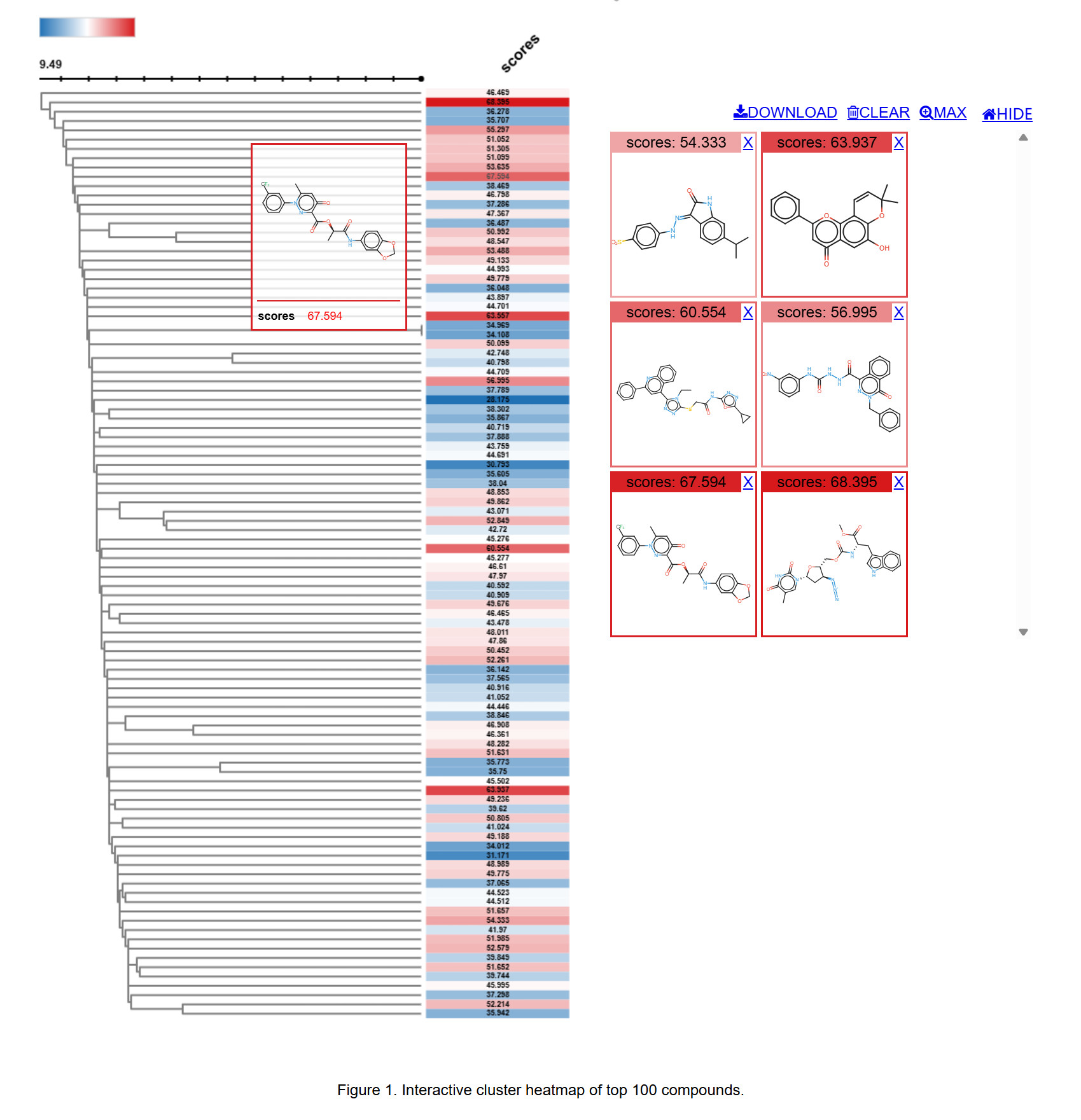
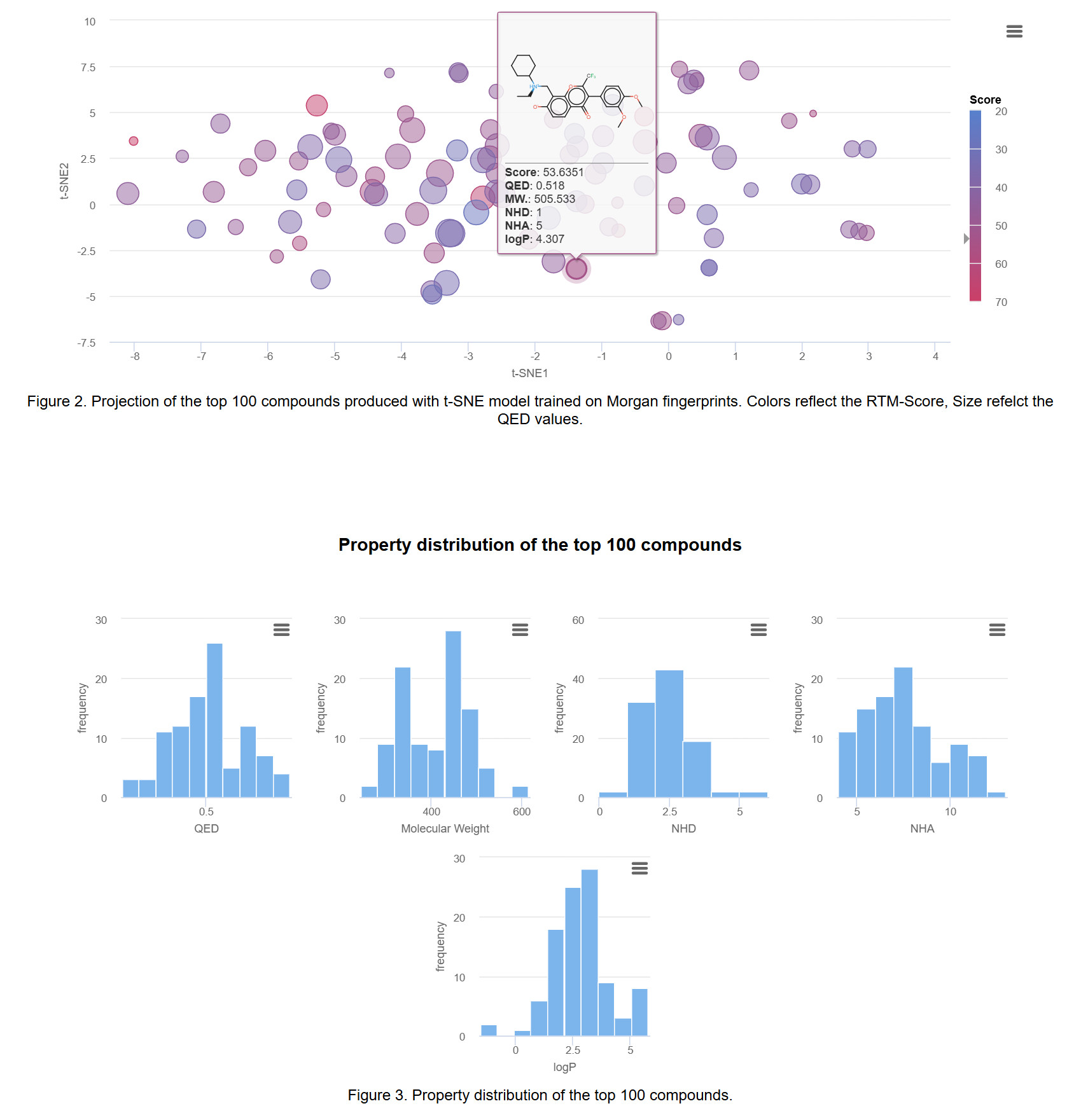
Top100 chemical space visualization: Based on interactive chemical space visualization methods, visualizing the structure and properties of top-100 molecules can help you visually view the relationship between compound categories and scoring values, and then select compounds of interest for further experiments.
Efficient Virtual Screening with HeVS Module
The HeVS (Highly efficient Virtual Screening) module implements the KarmaDock algorithm for rapid virtual screening of large compound libraries. This protocol achieves docking speeds of approximately 0.015 seconds per molecule while maintaining competitive accuracy. The module is designed for large-scale screening applications requiring efficient processing of up to 1 million compounds. For larger compound libraries, please download our local version.
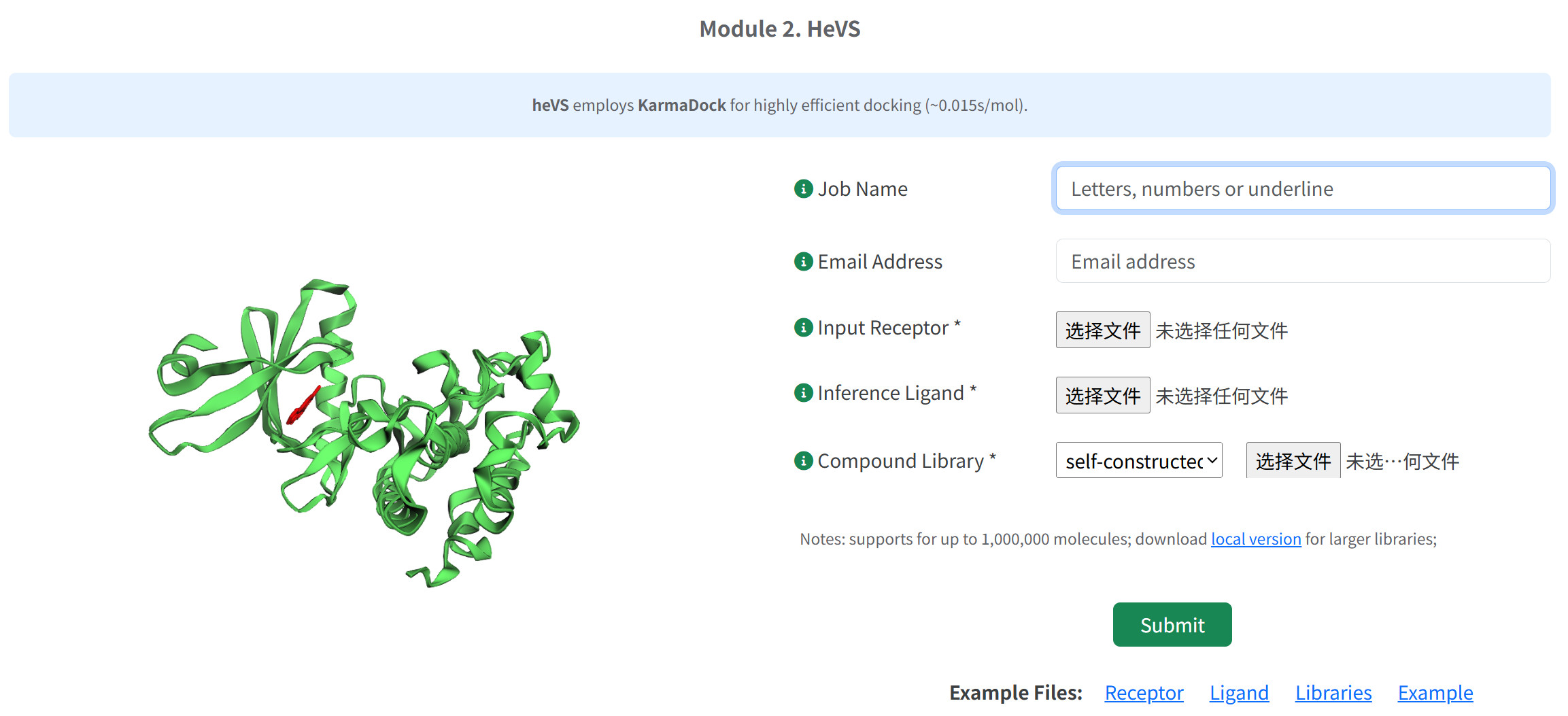
The process here is similar to that of HierarchicalVS Module, please refer to the corresponding section.
- Job Identification and Tracking
- (Optional) Enter a descriptive Job Name for result identification and management.
- (Optional) Provide valid Email Address for notification upon job completion.
- Receptor Structure Preparation
Upload protein structure file in PDB format.CAUTION Please preprocess the target protein file with the platform's pre-processing module before uploading.
- Reference Ligand Specification
Input known active ligand to define binding site coordinates. The protocol requires the submission of a ligand structure in one of the supported formats (MOL, PDB, MOL2, or SDF). The system automatically extracts the ligand's spatial coordinates and defines a search space around these coordinates.CAUTION For users unfamiliar with extracting active small molecules from protein structures, follow this protocol to ensure accurate binding site definition: First, retrieve the target protein structure (e.g., via RCSB PDB) and use our preprocessing module (Pre-processing of protein → Processed Ligand Components in PDB Format) to isolate embedded ligands. Critically, validate that the extracted ligand in a biologically relevant cavity (e.g., catalytic site or allosteric pocket) by cross-referencing RCSB annotations and published literature.
- Compound Library Selection
Choose from two library options:
Option A: Self-constructed Library- Upload custom compound library in SMILES formats
- Maximum capacity: 1,000,000 molecules
CAUTION Please preprocess the compound library with the platform's pre-processing module before uploading.
TROUBLESHOOTING We also provide local version of HierarchicalVS (https://github.com/shukai1997/HierVS) for much larger libraries screening.
Option B: Pre-curated Libraries
Select from four established databases:- ChemDiv_clustered_300K: Approximately 300,000 diverse compounds from Chemical Diversity
- Enamine_HHL_460K: Approximately 460,000 high-hit-likelihood compounds
- Specs_SC_326K: Approximately 326,000 screening compounds from Specs
- DrugBank_2K: 2044 approved drugs (molecular weight range 100-600)
CAUTION Platform-provided libraries are academic research use only
- Submission of heVS
- Job monitoring of heVS
Check the web page displaying the job ID and the URL links for tracking the job status and the modeling results upon submission.CRITICAL STEP We recommend bookmarking the result page right after your submission.
- Result Analysis and Interpretation
Upon job completion, a list of modeling results is provided for download at the top of the result page.- Downloadable KarmaDock Prediction Result
The KarmaDock Prediction Result CSV file provides a comprehensive ranking of screened compounds based on the KarmaDock scoring algorithm, with entries sorted in descending order of the primary score, karma_score. Each record in the CSV includes the following critical fields: the InChIKey (a standardized molecular identifier ensuring chemical uniqueness), the composite karma_score(representing the overall predicted binding affinity from the raw model output). Crucially, the file also provides two alternative scores derived from different post-processing strategies applied to the predicted ligand pose: karma_score_ff(the score after force field optimization to refine bond lengths and angles) and karma_score_aligned(the score after alignment to a chemically ideal RDKit-generated conformation). These post-processing methods enhance the chemical rationality of the pose but may trade off some docking accuracy. Additionally, the file contains the SMILES representation of each molecule, enabling precise structural reconstruction and cheminformatics analysis, and the mol_namefor easy compound identification. - Chemical Space Visualization and Analysis
The platform incorporates advanced chemical space visualization tools that enable researchers to perform interactive analysis of virtual screening results. This module provides three distinct but complementary visualization approaches to facilitate compound selection and prioritization based on multidimensional chemical properties.- Interactive Cluster Heatmap Analysis
- t-SNE Projection of Top 200 Compounds
- Multivariate Property Distribution Analysis
- Downloadable KarmaDock Prediction Result
Precise Virtual Screening with HpVS Module
The HpVS (High-precision Virtual Screening) module within the CVSP-AIE platform integrates CarsiDock for structure-based docking and RTMScore for AI-enhanced binding affinity rescoring, enabling accurate protein-ligand interaction predictions. This protocol supports screening of compound libraries containing up to 10,000 molecules via the web interface, with larger libraries processed using the local standalone version.
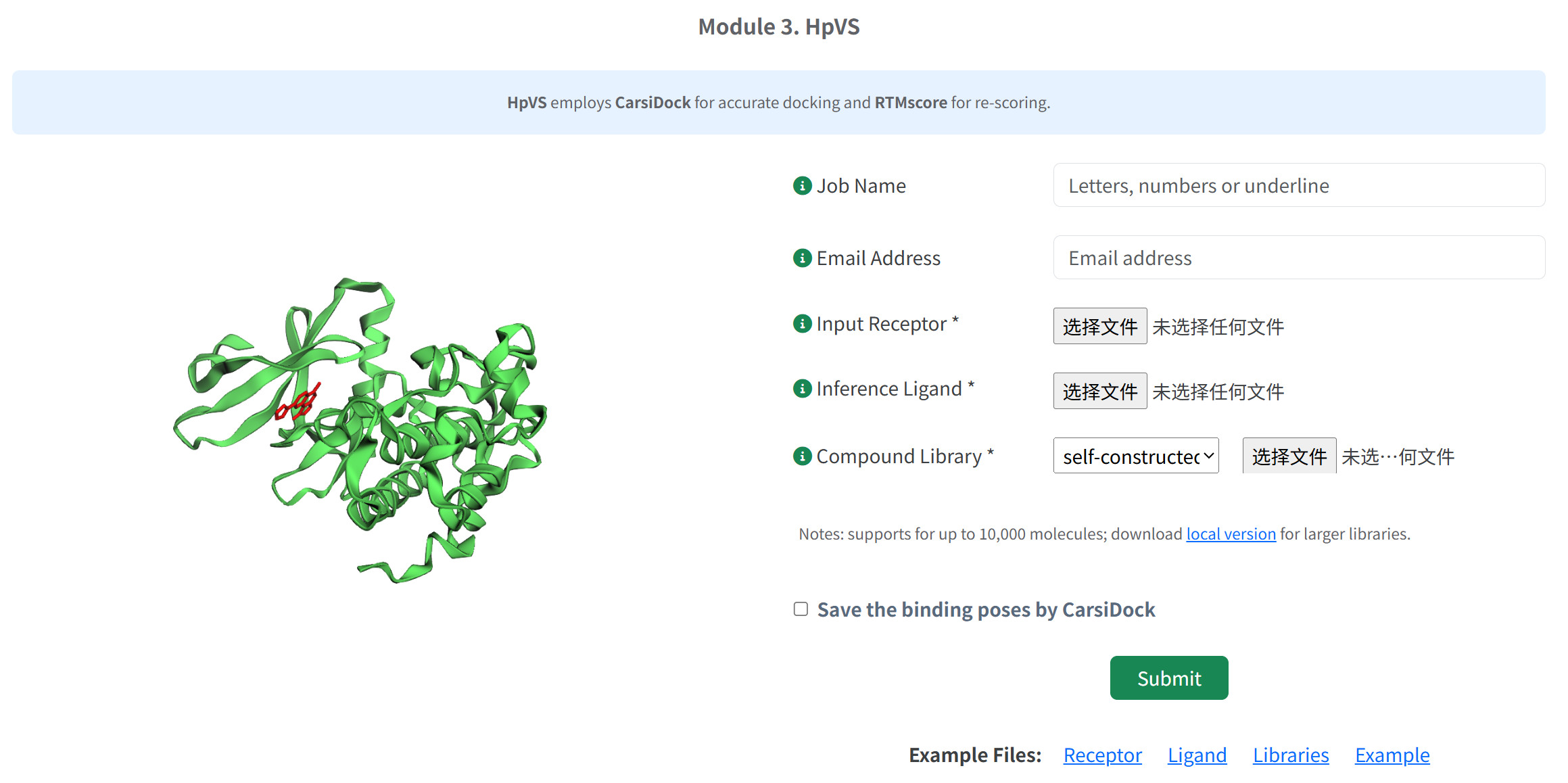
The process here is similar to that of HierarchicalVS Module, please refer to the corresponding section.
- Job Identification and Tracking
- (Optional) Enter a descriptive Job Name for result identification and management.
- (Optional) Provide valid Email Address for notification upon job completion.
- Receptor Structure Preparation
Upload protein structure file in PDB format.CAUTION Please preprocess the target protein file with the platform's pre-processing module before uploading.
- Reference Ligand Specification
Input known active ligand to define binding site coordinates. The protocol requires the submission of a ligand structure in one of the supported formats (MOL, PDB, MOL2, or SDF). The system automatically extracts the ligand's spatial coordinates and defines a search space around these coordinates.CAUTION For users unfamiliar with extracting active small molecules from protein structures, follow this protocol to ensure accurate binding site definition: First, retrieve the target protein structure (e.g., via RCSB PDB) and use our preprocessing module (Pre-processing of protein → Processed Ligand Components in PDB Format) to isolate embedded ligands. Critically, validate that the extracted ligand in a biologically relevant cavity (e.g., catalytic site or allosteric pocket) by cross-referencing RCSB annotations and published literature.
- Compound Library Selection
Choose from two library options:
Option A: Self-constructed Library- Upload custom compound library in SMILES formats
- Maximum capacity: 10,000 molecules
CAUTION Please preprocess the compound library with the platform's pre-processing module before uploading.
TROUBLESHOOTING We also provide local version of HierarchicalVS (https://github.com/shukai1997/HierVS) for much larger libraries screening.
Option B: Pre-curated Libraries
Select from established databases:- DrugBank_2K: 2044 approved drugs (molecular weight range 100-600)
- Submission of hpVS
- Job monitoring of hpVS
Check the web page displaying the job ID and the URL links for tracking the job status and the modeling results upon submission.CRITICAL STEP We recommend bookmarking the result page right after your submission.
- Result Analysis and Interpretation
Upon job completion, a list of modeling results is provided for download at the top of the result page. The HpVS results includes the prediction scores from KarmaDock and RTMScore, the molecular conformations generated by CarsiDock (if you choose to keep them), the the calculation and visualization of protein-ligand, along with the chemical space analysis of the top ranked compounds. The process here is similar to that of HierarchicalVS Module, please refer to the corresponding section.
High-precision Rescoring with HpRS Module
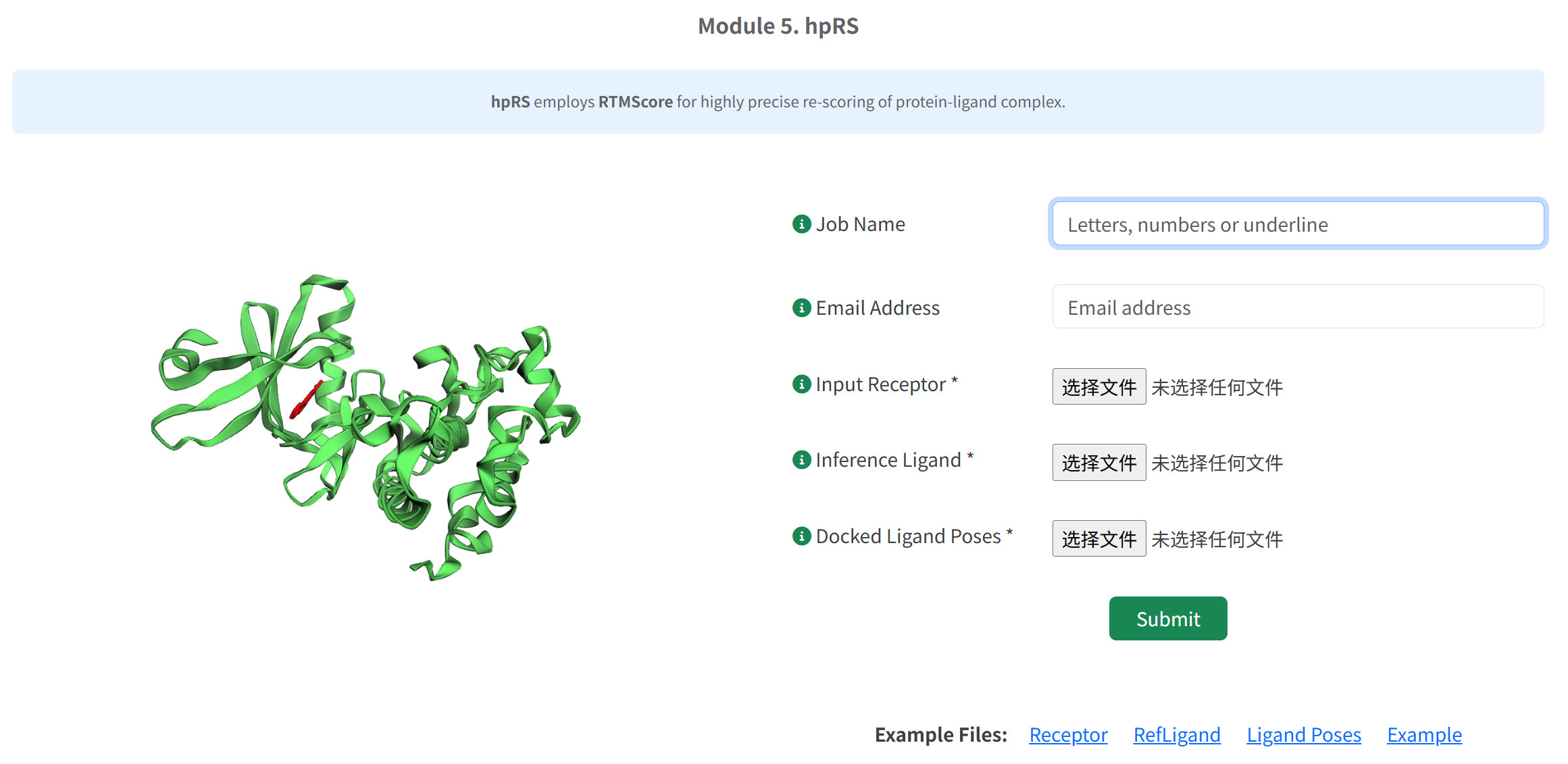
The HpRS (High-precision Rescoring) module employs the RTMScore algorithm to refine protein-ligand binding affinity predictions through graph transformer-based rescoring. This protocol is designed for post-docking optimization, enhancing the accuracy of binding energy estimations for pre-generated ligand poses.
- Job Identification and Tracking
- (Optional) Enter a descriptive Job Name for result identification and management.
- (Optional) Provide valid Email Address for notification upon job completion.
- Receptor Structure Preparation
Upload protein structure file in PDB format.CAUTION Please preprocess the target protein file with the platform's pre-processing module before uploading.
- Reference Ligand Specification
Input known active ligand to define binding site coordinates. The protocol requires the submission of a ligand structure in one of the supported formats (MOL, PDB, MOL2, or SDF). The system automatically extracts the ligand's spatial coordinates and defines a search space around these coordinates.CAUTION For users unfamiliar with extracting active small molecules from protein structures, follow this protocol to ensure accurate binding site definition: First, retrieve the target protein structure (e.g., via RCSB PDB) and use our preprocessing module (Pre-processing of protein → Processed Ligand Components in PDB Format) to isolate embedded ligands. Critically, validate that the extracted ligand in a biologically relevant cavity (e.g., catalytic site or allosteric pocket) by cross-referencing RCSB annotations and published literature.
- Docked Ligand Poses Selection upload the binding poses of small molecules generated by other docking tools, such as Glide, AutoDock, or DiffDock, then submit the task.
- Submission of hpVS
- Job monitoring of hpVS
Check the web page displaying the job ID and the URL links for tracking the job status and the modeling results upon submission.CRITICAL STEP We recommend bookmarking the result page right after your submission.
- Result Analysis and Interpretation
Upon job completion, a list of modeling results is provided for download at the top of the result page. The results includes the prediction scores from RTMScore and the calculation and visualization of protein-ligand interactions.
Protein-ligand Interaction Analysis with CvPL Module
The CvPL (Calculation and visualization of Protein-Ligand interaction) module can then be employed for conducting protein-ligand interaction visualization and analysis for the given protein structure and ligand conformation.
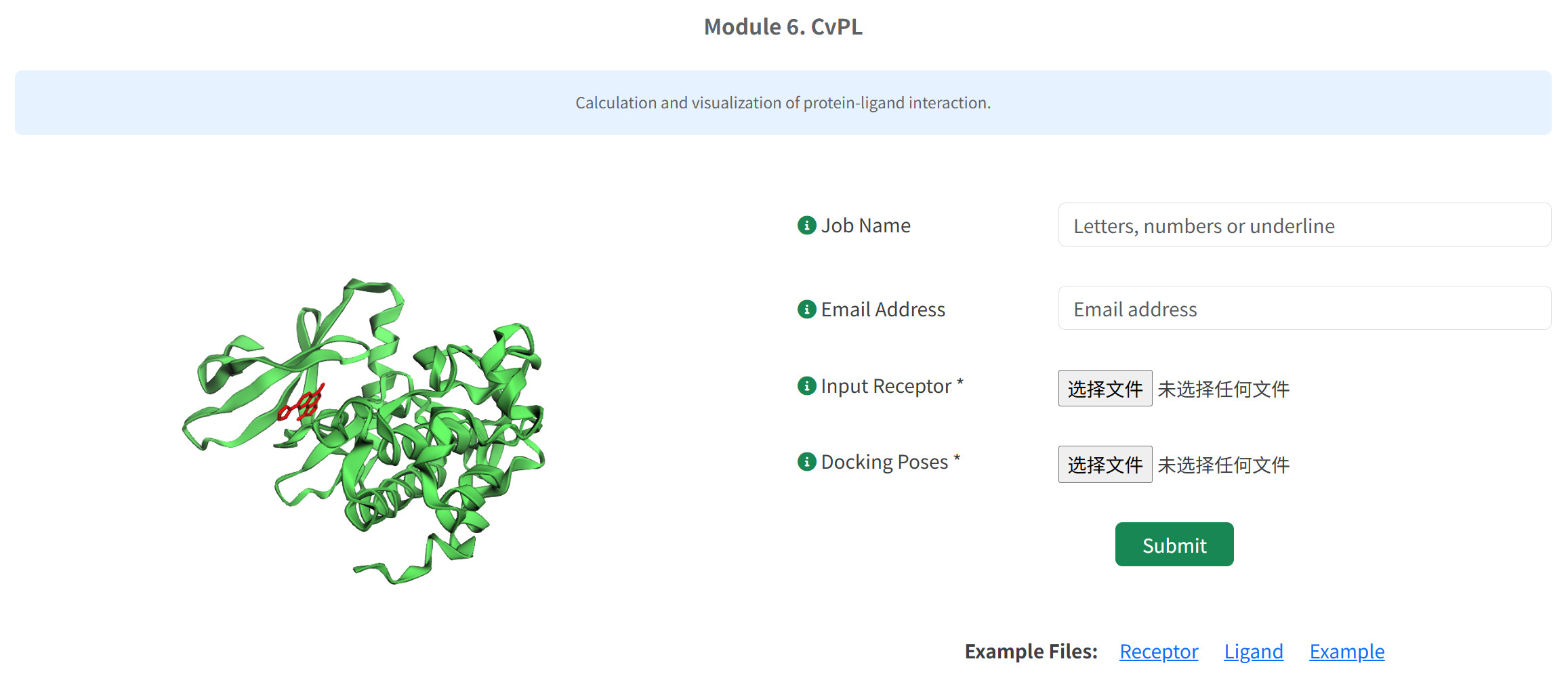
Upload the protein and the pose of ligands and submit the job, you will obtain an analysis of their interaction along with their visualization when the job finish.
The detailed analysis of interactions including:
| Interaction Type | Description | Visual Representation |
|---|---|---|
| Hydrogen Bonds | Polar interactions between hydrogen bond donors and acceptors | Dashed lines (yellow) |
| Halogen Bonds | Interactions involving halogen atoms as electrophiles | Dashed lines (purple) |
| π-Stacking | Face-to-face or edge-to-face aromatic ring interactions | Dashed lines (aqua) |
| Cation-π Interactions | Attractive force between cations and π-systems | Dashed lines (green) |
| Hydrophobic Interactions | Non-polar associations between hydrophobic groups | Dashed lines (lime) |
| Salt Bridges | Electrostatic interactions between oppositely charged groups | Dashed lines (pink) |
There is an Interaction Details Table below the 3D Visualization Window in the result interface, listing all detected interactions with atomic-level precision:
- Residue: Protein residue involved (e.g., TRP:760A)
- Chain: Protein chain identifier
- Atom on Protein: Specific protein atom participating in interaction
- Atom on Ligand: Specific ligand atom participating in interaction
- Interaction Type: Classification of the interaction
Local version of CVSP-AIE
Due to computational resource constraints on the online server, a single task can process a maximum of 1 million small molecules. But VS often involves compound libraries that exceed this scale. To address this requirement, users can utilize the provided local installation package, which incorporates the core hierarchical screening module and, once deployed, supports the screening of compound libraries of any size. The specific operational procedure is as follows: prepare the hardware and software as required in the Equipment section. Then download the provided Docker image from the remote repository and deploy it locally. Subsequently, install the latest version of HierVS package. Upon completion, the HierVS command can be executed in the terminal to initiate the screening task by specifying related parameters. The compound library preprocess operates automatically in VS workflows. Please read the ReadMe and download the local version of our tool from https://github.com/shukai1997/HierVS.
FAQ & Support
- Standardize Input Files:Preprocess your compound library through the dedicated Preprocess module prior to screening.
- Validate File Format:Carefully compare your input files with the provided template files. Pay particular attention to field delimiters, molecular structure representation, and required data fields.
- Consider File Conversion:Utilize established cheminformatics tools like Open Babel or RDKit for format conversion and validation. These tools can identify and correct common structural issues.
- Contact Technical Support:If the issue persists, please contact our support team at 3160101168@zju.edu.cn with the following
information:
- Complete error logs from the failed job
- Relevant input files (or a representative subset)
- Description of the specific workflow and parameters used
CVSP-AIE implements strict data protection protocols:
- All user data is encrypted during transfer and storage
- Uploaded structures and results are accessible only to the owner
- Data is automatically purged 14 days after job completion
- For maximum privacy concerns, we recommend using the local version
In the hierarchical screening module of CVSP-AIE, Karmadock is first employed to perform initial docking and scoring for all molecules in the candidate compound library. Based on the scoring results, the Top‑N ranked molecules are selected for further docking and re-scoring with CarsiDock and RTMScore. This design is primarily motivated by the considerations that KarmaDock exhibits significantly higher computational efficiency than CarsiDock—approximately 100‑fold faster—making it suitable for rapid preliminary screening of large‑scale compound libraries. (10.1038/s43588-023-00511-5, 10.1039/D3SC05552C) However, our previous studies have demonstrated that Carsidock performs better in terms of structural rationality of docked conformations, RMSD metrics, and retrospective virtual screening evaluations. (10.1039/D3SC05552C, 10.1038/s42256-025-00993-0) Theoretically, if computational resources are unrestricted, a larger top‑N value would lead to screening results closer to the optimum. In practical drug screening, however, a balance must be struck between efficiency and accuracy. Based on our experience, we recommend setting the upper limit of top‑N to 10% of the total number of molecules obtained from the KarmaDock preliminary screening. Exceeding this threshold would substantially increase unnecessary computational overhead and restrict the explorable chemical space. Moreover, molecules that do not rank within the top 10% of the KarmaDock screening generally have a low probability of being active. On the other hand, the lower limit of top‑N is recommended to be 0.5% of the total number of molecules from the KarmaDock initial screening. This setting helps to reasonably allocate resources across different computational stages, and our retrospective evaluations indicate that a certain number of active molecules can already be enriched from the top 0.5% of molecules ranked by KarmaDock. (10.1038/s43588-023-00511-5, 10.1038/s42256-025-00993-0,) Therefore, for the online version of CVSP-AIE, we suggest setting the top‑N value within the range of 0.5% to 10% of the total number of molecules in the compound library, with the absolute value falling between 10 and 10,000. For the local version, users may either follow the online‑version recommendations or appropriately increase the top‑N value according to their actual computational resources to obtain more comprehensive screening results.
Statements
- Data are used solely to fulfill the service requested by the user;
- Data are retained for a maximum period of two weeks, after which the platform will automatically delete the data. Users retain the right to access and delete their data at any time;
- Data are never shared with any third party;
- CVSP-AIE is distributed under the MIT License, allowing commercial and other users to freely use or adapt the software.
- Platform maintainers do not retain, analyze, or reuse uploaded data for research, model development, or any other purposes.
For further assistance, please contact us: 3160101168@zju.edu.cn