Module 1. Pre-process
The module of Pre-process is to make sure that your uploaded protein and compound library file can be smoothly dealt in the VS period
bookNotes
(1) Supported format of compound library: smiles or txt (all values must separated by tabs). * download example.smi
(2) File content requirements:
The first column of the compound library file must be SMILES, the second column must be the molecular name, and the tab (\t) is used as the separator;
CC(=O)Oc1ccccc(=C)c1C(=O)O
CC1([C@@H](N2[C@H](S1)[C@@H](C2=O)NC(=O)CC3=CC=CC=C3)C(=O)O)C
tabAspirinCC1([C@@H](N2[C@H](S1)[C@@H](C2=O)NC(=O)CC3=CC=CC=C3)C(=O)O)C
tabBenzylpenicillin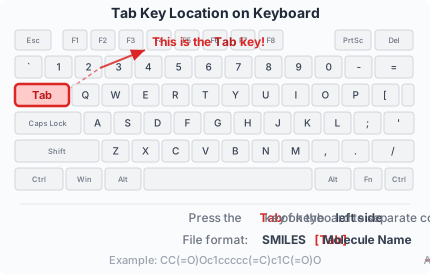
(3) The number of compounds is limited to [1, 1000000];
book Methodological Details
To ensure computational reproducibility, the complete preprocessing workflow is documented below, including all software versions and algorithmic parameters.
Software & Version
- Primary Tool: Schrödinger Suite 2024-2
- Utility:
prepwizard - Alternative Options: UCSF Chimera, MODELLER, OpenMM
Command Execution
prepwizard -rehtreat -fillsidechains -fillloops -propka_pH {receptor_ph} -NOJOBID {input.pdb} {output.pdb}Step-by-Step Processing
| Step | Flag/Parameter | Purpose | Algorithm Details |
|---|---|---|---|
| 1. Hydrogen Bond Optimization | -rehtreat |
Rebuild hydrogen bond network | Optimizes H-bond assignment using geometric constraints |
| 2. Missing Side Chains | -fillsidechains |
Add missing side chain atoms | Uses rotamer library with energy minimization |
| 3. Missing Loops | -fillloops |
Model missing backbone regions | Prime-based loop modeling (Schrödinger) |
| 4. Protonation States | -propka_pH {pH} |
Set residue protonation at target pH | PROPKA 3.0 algorithm (default pH: 7.0) |
Force Field & Parameters
- Force Field: OPLS3e (default for Schrödinger 2024-2)
- Water Treatment: All crystallographic waters removed
- Ions/Cofactors: Removed by default; retain manually if biologically relevant
- Output Format: PDB with standardized atom naming
Note on Reproducibility: For alternative tools, ensure equivalent steps:
1) Hydrogen addition at pH 7.0, 2) Missing atom reconstruction,
3) Energy minimization with OPLS3e/AMBER/CHARMM force field.
Software & Version
- Primary Tool: RDKit (≥ 2024.03.3)
- Programming Language: Python 3.8+
- Dependencies: multiprocessing, tqdm, func-timeout
Complete Processing Pipeline
1. SMILES Parsing
→
2. InChIKey Generation
→
3. Molecular Weight Filter
→
4. PAINS Filter
→
5. Standardization
→
6. 3D Feasibility Check
→
7. Output Generation
Detailed Processing Steps
1. Input Validation & Parsing
# RDKit SMILES parsing with timeout
from rdkit import Chem
mol = Chem.MolFromSmiles(smiles_str)
# Timeout: 1 seconds per molecule
# Output: Valid RDKit molecule object or failure
2. InChIKey Generation & Deduplication
# Generate InChIKey for deduplication
inchikey = Chem.MolToInchiKey(mol)
# Only first occurrence of each InChIKey is retained
# This ensures unique compound entries
3. Molecular Property Filtering
| Filter | Function | Default Parameters | User Control |
|---|---|---|---|
| Molecular Weight | Descriptors.ExactMolWt() |
Min: 100 Da, Max: 1000 Da | Web interface: lig_mw_min, lig_mw_max |
| PAINS Filter | FilterCatalog(PAINS) |
Remove all PAINS matches | Web interface: lig_remove_pains (0/1) |
params = FilterCatalog.FilterCatalogParams()
params.AddCatalog(FilterCatalog.FilterCatalogParams.FilterCatalogs.PAINS)
catalog = FilterCatalog.FilterCatalog(params)


@func_set_timeout(time_out)
def contain_pains(mol):
    try:
        if catalog.HasMatch(mol):
            return True
        return False
    except:
        return True
4. Chemical Standardization
from rdkit.Chem import rdMolStandardize

# Step-by-step standardization
def standardize_smi(mol, clearCharge=True, canonTautomer=False):
    # 1. Basic cleanup
    mol = rdMolStandardize.Cleanup(mol)
    # 2. Keep largest fragment
    mol = rdMolStandardize.FragmentParent(mol)
    # 3. Neutralize charges (optional)
    if clearCharge:
        uncharger = rdMolStandardize.Uncharger()
        mol = uncharger.uncharge(mol)
    # 4. Tautomer canonicalization (disabled by default)
    # The default setting for canonTautomer is False, as setting it to True may sometimes result in the removal of chiral structures
    if canonTautomer:
        te = rdMolStandardize.TautomerEnumerator()
        mol = te.Canonicalize(mol)
    return Chem.MolToSmiles(mol, isomericSmiles=True)
5. 3D Feasibility Filter (Critical Step)
Important: This step is a filter, not a preparation step.
It identifies molecules that cannot form reasonable 3D geometries,
which would cause failures in the 3D-based CVSP-AIE screening phase.
from rdkit.Chem import AllChem
from func_timeout import func_set_timeout

# Timeout setting for conformer generation
time_out = 1  # seconds

@func_set_timeout(time_out)
def add_conformer(mol):
    """Generate 3D conformer with timeout protection"""
    feed_back = AllChem.EmbedMolecule(mol)
    if feed_back == -1:  # Embedding failed
        return -1
    return mol

def ff_refined_mol_pos(mol, n_max=100):
    """Force field refinement with maximum attempts"""
    feed_back = [[-1, 1]]  # Initialize with failure state
    n = 0
    # Continue optimization until success or max attempts reached
    while feed_back[0][0] == -1 and n < n_max:
        feed_back = AllChem.MMFFOptimizeMoleculeConfs(mol, mmffVariant='MMFF94s')
        n += 1
    return mol

def check_smi2conformer(mol):
    """
    Complete 3D feasibility check pipeline
    Returns: RDKit mol object if successful, error string if failed
    """
    # Add hydrogens for accurate 3D representation
    mol = Chem.AddHs(mol)

    # Generate 3D conformer with timeout protection
    m_mol = add_conformer(mol)

    if m_mol == -1:  # Conformer generation failed
        return 'gen_conformer_failure'
    else:
        mol = m_mol
        try:
            # Force field refinement with up to 100 attempts
            mol = ff_refined_mol_pos(mol, n_max=100)
            # Remove hydrogens for final output
            mol = Chem.RemoveAllHs(mol)
            return mol
        except:
            return 'gen_conformer_failure'
6. Output Files
The standardized 2D SMILES and the user-provided molecule name are written to “processed_library.smi”. This file is the direct input for the CVSP-AIE screening workflow. Molecules failing any step (invalid, duplicate, PAINS, 3D generation, etc.) are logged in “removed_molecules.tsv”.| File | Format | Content | Purpose |
|---|---|---|---|
processed_library.smi |
Tab-separated | Standardized SMILES, Original Name | Input for CVSP-AIE screening |
removed_molecules.tsv |
Tab-separated | Original SMILES, Error Type, Name, InChIKey | Debugging and audit trail |
Reproducibility Guidelines
For Exact Reproduction:
- Use Schrödinger 2024-2 or later for protein preparation
- Use RDKit ≥ 2024.03.3 for ligand preparation
- Follow the exact parameter sequence shown above
- The 3D feasibility filter must remain enabled for CVSP-AIE compatibility
Alternative Software Options:
If Schrödinger is unavailable:
- Use UCSF Chimera DockPrep with AddH (pH 7.0)
- Use MODELLER for loop modeling
- Use PDBFixer + PropKa for protonation
If RDKit is unavailable:
- Open Babel for basic standardization
- Commercial tools (e.g. OpenEye Toolkit) for comprehensive preparation
Note: Using different tools may affect downstream results.